
How To Play Moneyplane
Moneyplane plays by deciding on a fundamental premise, and while easy to understand, it's hard to master: when do you cash out? Everything below is the mechanics around that question – how a round runs, what each control does, and how to configure the bet to suit your strategy.
The Round
How to play Moneyplane, step by step
Moneyplane rounds are short, often less than a minute. Learn the four key steps in each round to grasp the fundamentals, then adapt your strategy as your game experience develops with continued play.
-
Place your bets during the countdown
Every round is introduced by a countdown timer, and that period is the only time you can join the upcoming round. Confirm your stake on the bet panel and press PLACE BET. Adjust the amount with the ‘+’ and ‘−’ buttons, or type a value in directly.
Changed your mind? CANCEL recalls the bet as long as the plane has not taken off. The countdown is also the moment to stop autoplay if it is running.
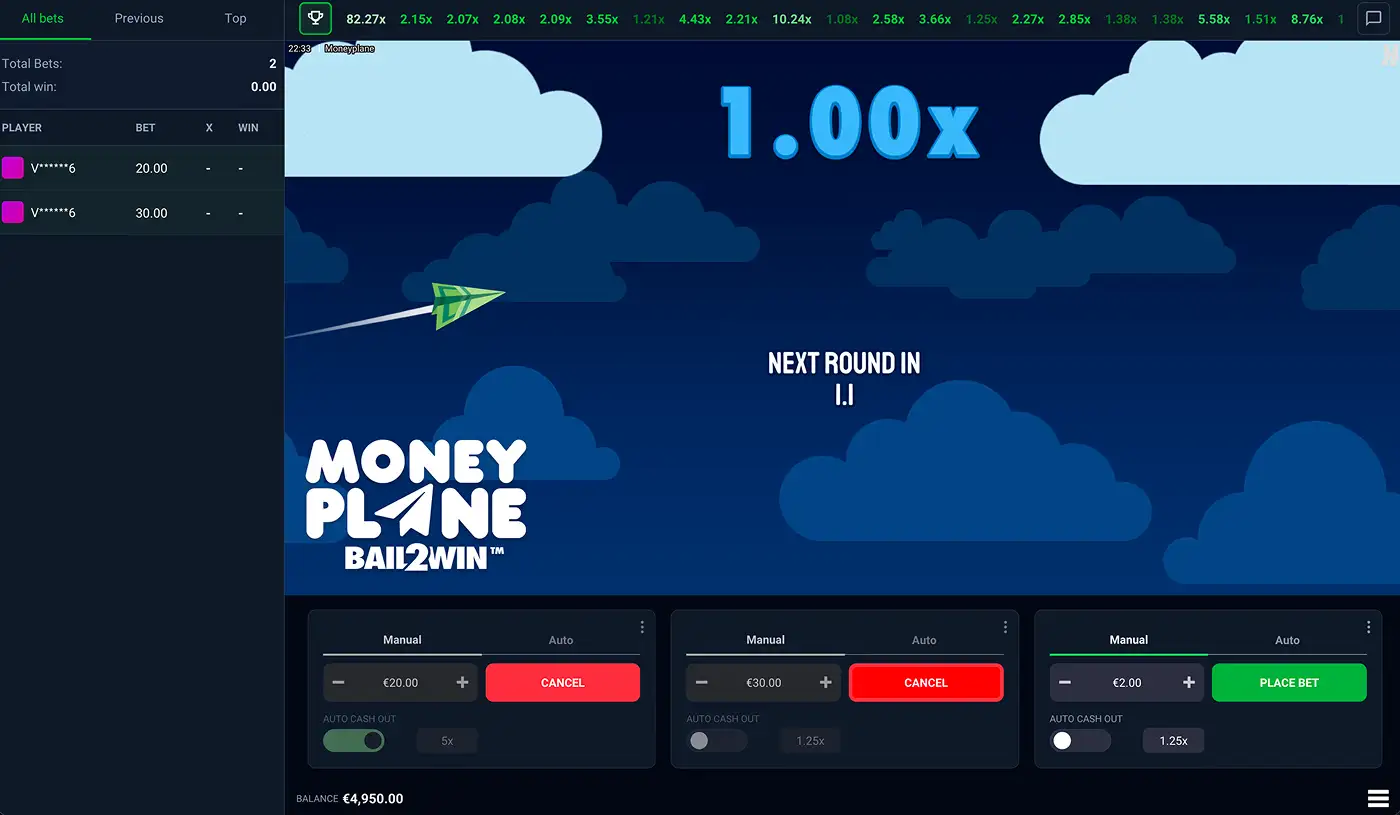
The pre-round countdown, showing the only window in which a bet can join the round about to start. Two stakes of €20 and €30 are locked in and can still be recalled with CANCEL, while the third panel is free to place a €2 bet before the plane takes off. -
Wait for the round to start
The plane takes off and the multiplier starts counting from ×1.00. Betting on this round is now closed – you can't join a round in progress.
Any bet panel that does not already carry a bet stays usable, though. You can queue a stake for the next round while the current plane is still climbing, which is normal to ensure you are prepared for the next round.
-
Watch the multiplier climb to your target
The multiplier climbs continuously as the plane remains in flight, all the way to the game's ×10,000 ceiling if it gets there. Nothing on screen tells you where this round ends, because nothing knows – the crash point is set at random and the plane can go down at ×1.02 or ×400.
This is the part worth deciding ahead of time. A cash out target picked before the round is a plan; a cash out target picked at ×3 while the number is still climbing is a guess.
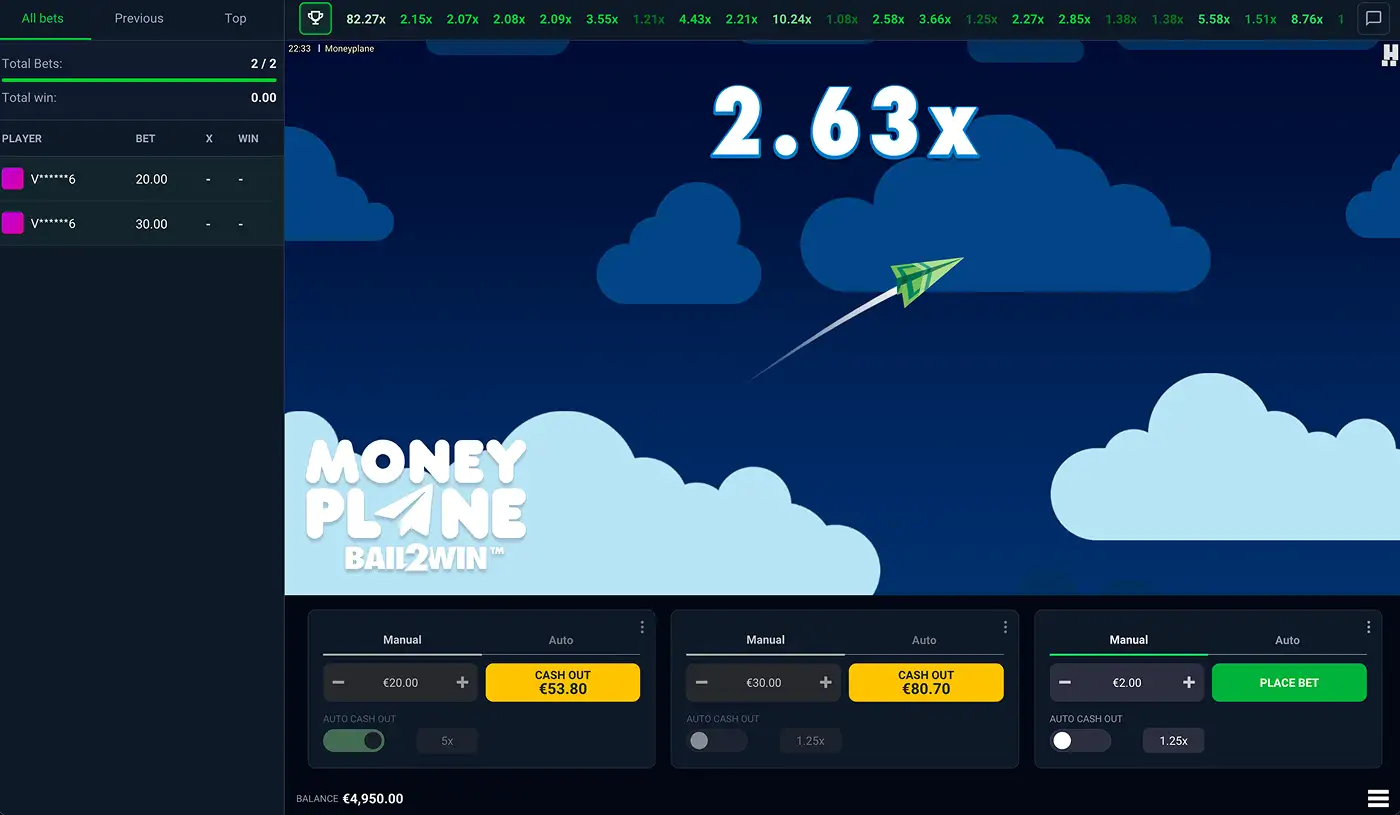
A round in flight with the multiplier passing ×2.63. Both bets are still in the air, and each CASH OUT button counts up with the plane to show what that stake is worth at this moment. Nothing on the screen indicates how much further it will climb. -
Cash out to collect your winnings
Press CASH OUT on the bet panel before the round ends. Your win is that panel's bet multiplied by the rising coefficient at the time you collected – cash out at ×3.40 on a €10 bet and €34.00 lands in your balance.
Miss it and the stake is gone. Failing to cash out before the crash is a total loss on that panel, with no partial return and no refund on a round that crashes early.
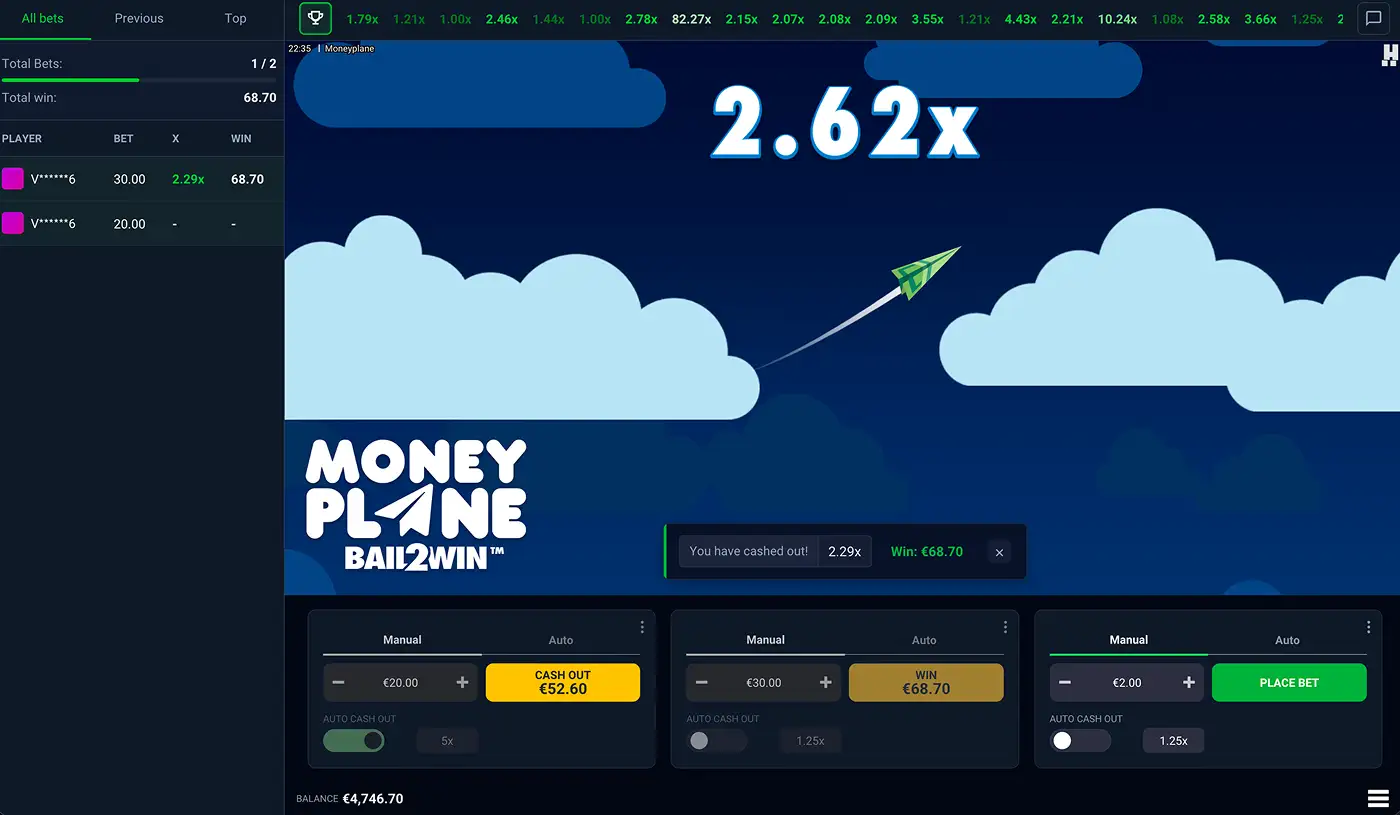
A collected bet. The €30 stake cashed out at ×2.29 and returned €68.70, confirmed both on screen and in that panel. The €20 bet beside it is still riding the same flight at ×2.62.
Stakes
Bet limits
In the demo, each bet panel accepts a stake between 0.10 and 100. Those are per panel rather than per round, so three panels at the maximum put 300 in the air on a single flight.
The ceiling is not fixed for all casinos. Operators set their own maximum based on their exposure limits, so a real-money casino may offer far larger maximum bets than the demo. The minimum bet amount rarely moves. See where to play Moneyplane for the operators carrying it now.
Features
Running up to three bet panels
Each bet panel can only take one bet at a time. Press the plus icon in the bet panel area to add another, up to a maximum of three; the three dots in a panel's corner give you REMOVE to take one away again.
This is where players aim to build strategies. Each panel carries its own stake, its own Auto Cash Out target and its own cash-out button, so a single flight can hold a cautious bet set to collect at ×1.5 and a second one left running towards ×20. One banks something; the other keeps a stake in the air. Cashing out one panel has no effect on the others.

Auto Cash Out
Each bet panel has an Auto Cash Out toggle with a target multiplier beside it. Switch it on, set a value such as ×1.25, and the moment the coefficient achieves that number the panel collects automatically.
This is arguably the most useful control in the game, for two reasons. It removes the reaction-time penalty on low targets, where a human simply cannot click fast enough to guarantee the correct collect target. And it turns your target into a decision made calmly before the round rather than an emotional decision made during it.
Autoplay
The Auto tab on a bet panel opens the autoplay settings, which will place the same stake on consecutive rounds without any intervention. Three things get configured before it starts:
- Number of rounds – 10, 25, 50, 75, 100, 500 or 1000. Quick-pick buttons for 10, 25, 50 and 75 also sit next to the START AUTOPLAY button for a faster setup.
- Loss limit – stop automatically once losses reach 5×, 20× or 50× your bet, or select NO LIMIT to run without one.
- Single win limit – stop when any single win reaches 10×, 20× or 75× your bet, or NO LIMIT.
Press START AUTOPLAY and it runs. To stop it early, use the countdown window between rounds.
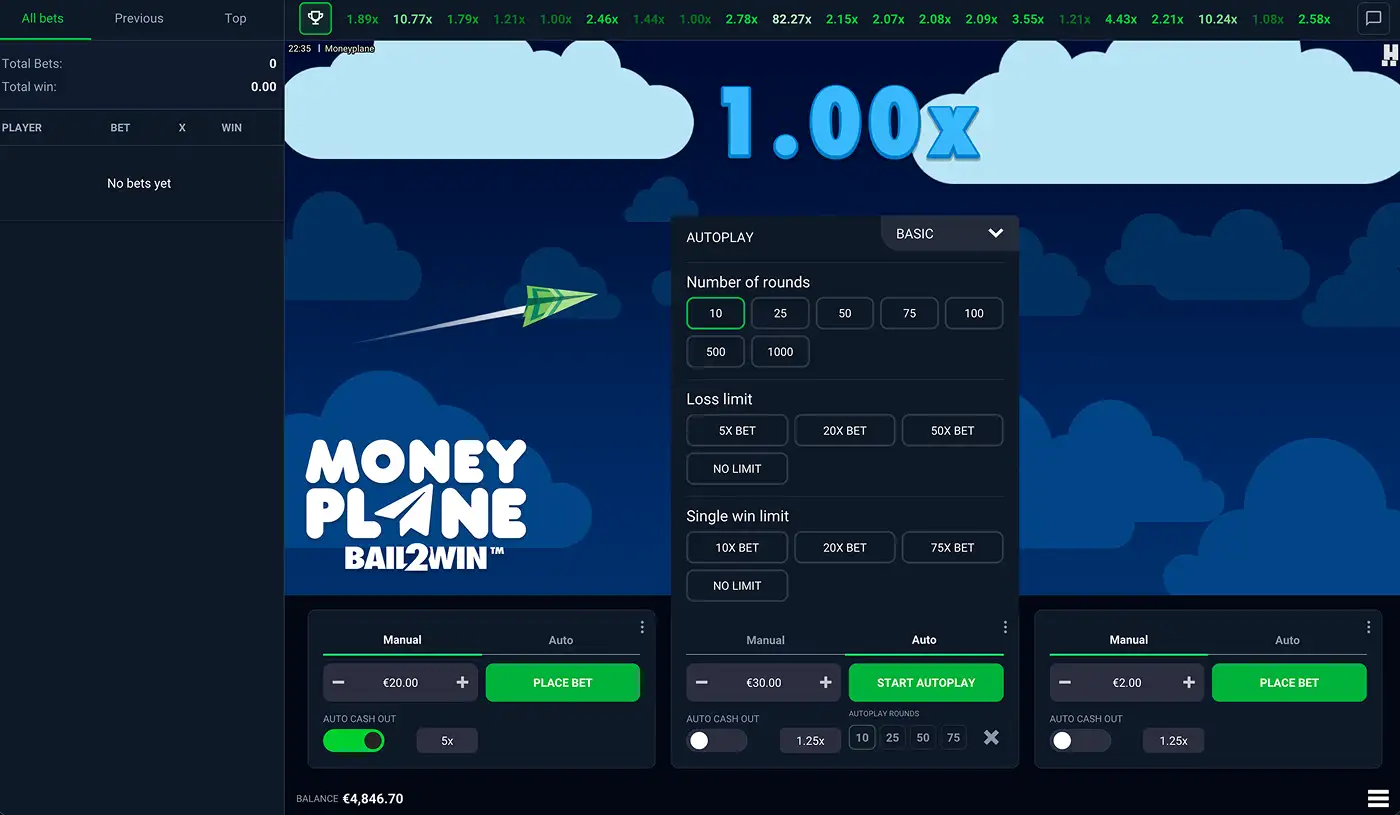
Autoplay does not cash out. It places a bet every round and collects nothing. Run it without an Auto Cash Out target on the same panel and it will ride every flight to the crash, losing the stake each time, until the round count or the loss limit stops it.
The Lobby
Chat, bet history and leaderboards
Moneyplane rounds are actually live rounds in a shared lobby. Everyone in it is betting against the same plane and the same multiplier, with some of the interface features revolving around live lobby experience.
- Live bet ticker – a window listing every bet in the current round, updating in real time as players cash out, with the multiplier each one collected at.
- Recent multipliers – a strip above the game view showing the final multiplier from recent rounds. Worth understanding correctly: each round is independent, so a run of low crashes predicts nothing about the next one.
- All bets and Previous – tabs on the window covering the current round and the one before it, with every player's stake and outcome.
- Top wins – a leaderboard of the biggest winning multipliers, filterable by day, week, month and year.
- Chat – open it from the chat icon to talk to others in your lobby. Hacksaw's own rules describe it as unmoderated, with the studio taking no responsibility for how players use it. Worth knowing before you open it.
Questions
Frequently asked questions
What happens if I don't cash out in time?
The stake on that panel is lost in full. There is no partial cash-out and no refund, including on rounds that crash almost immediately.
Can I join a round that has already started?
No. Bets are placed during the countdown only. You can, however, queue a bet for the next round on any panel that is not already carrying one, while the current plane is still flying.
How many bets can I place at once?
Up to three, one per bet panel. Add panels with the plus icon and remove them from the three-dot menu in a panel's corner.
Does autoplay cash out for me?
No, and this catches people out. Autoplay only places bets. Pair it with Auto Cash Out on the same panel, or every autoplayed round rides to the crash.
What are the minimum and maximum bets?
The demo runs from 0.10 to 100 per bet panel. Operators can raise the maximum according to their own exposure limits, so real-money ceilings vary between casinos.
Do the recent multipliers help me predict the next round?
No. Every round's crash point is generated independently. The history strip is information about what happened, not a signal about what is coming.
Can I practise without risking money?
Yes. The free demo runs the same 97% RTP and the full feature set on virtual credits, with no account needed.